
At a glance
| Capability | Musael | Scrivener |
|---|---|---|
| Draft a manuscriptOfficial descriptions establish writing; edition and platform conditions still apply. | Yes | Yes |
| Scene planning or document organizationMusael Plan and manuscript share scene records. General document/note organization is a different workflow. | Yes | Yes |
| Read saved scenes by POV or plotlineMusael Plan Revision uses explicit assignments. An equivalent competitor workflow was not established by the sources checked. | Yes | Unknown |
| Explicit fact, belief and source recordsMusael distinguishes recorded epistemic kind and passage evidence; a general story bible is not automatically the same data model. | Yes | Unknown |
| Check recorded knowledge timingAuthor-recorded acquisition and uses are compared in story time. No universal inference from prose; unknown dates stay uncertain. | Yes | Unknown |
| Live project collaborationEquivalent live editing was not verified; file sync and exporting are not treated as co-writing. | Yes | Unknown |
| Export for a recoverable manuscript handoffVerify the file format and round trip; comments, settings and proprietary records do not necessarily transfer. | Yes | Yes |
Scroll horizontally to see all columns. Unknown means the available source does not establish the feature.
Which one should you use?
Choose Musael when revising the book means working across the manuscript, its world and feedback from other people. Choose Scrivener when you want a mature desktop writing environment, a flexible research binder and detailed compile settings. Both can organize a long draft into small pieces. The more useful question is what happens after you move, rewrite or share those pieces.
We build Musael. This comparison explains where our workflow helps and where Scrivener remains a sensible choice. It is based on the official Scrivener overview and on the Musael implementation, not a timed test of two paid accounts.
Drafting and restructuring a manuscript
Scrivener's binder organizes writing and research into a hierarchy. Its corkboard, outline and Scrivenings view support working with individual sections or reading selected sections together. That matters for writers who want extensive control over how their project is arranged. Research files can sit alongside the draft rather than in a separate folder of bookmarks.
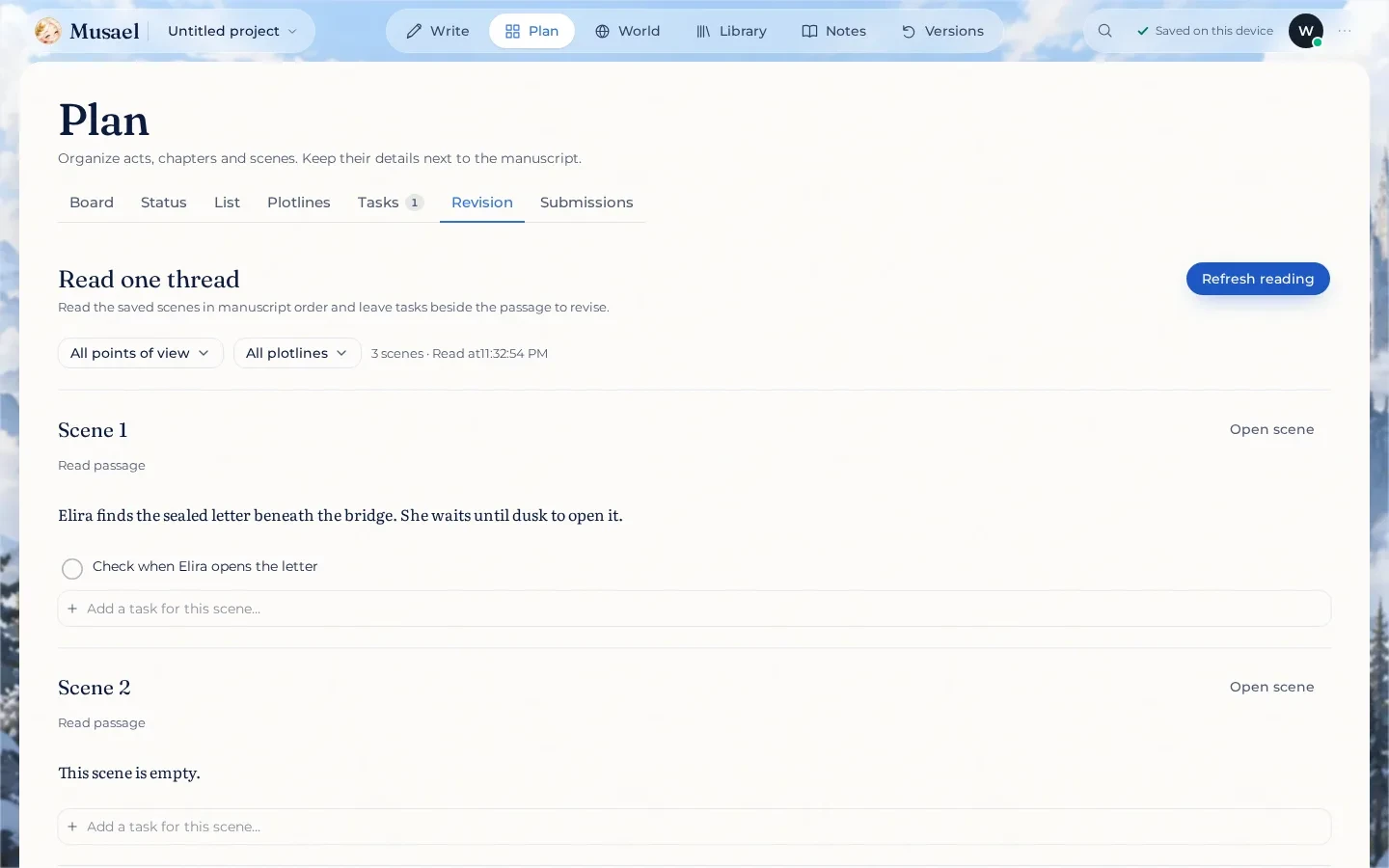
Actual Musael Plan Revision in a test project: saved passage and persistent task. This image is not a competitor benchmark.
Musael treats Manuscript and Plan as views of the same scene records. Moving a scene in the plan changes its place in the manuscript; an outline is not a second document to reconcile. Acts, chapters, scene synopses, status, POV and plotline notes help explain what each scene is doing. The editor stays mounted when you switch views, and project operations flush pending writing before capturing it.
Imagine a reveal that moves from chapter seven to chapter four. In either app you can move the writing. In Musael, the next job is to inspect the scene's World sources and read the affected POV or plotline through Plan → Revision. That reading uses saved prose, and revision tasks stay attached to the scenes. Scrivener's selected-section reading is useful too; a scene-reading feature alone is not unique to Musael.
Research notes versus explicit story records
Scrivener gives you a flexible place to collect research, character notes and reference material. Flexibility is an advantage when the project includes PDFs, images or unusual documents. A note saying that Elira learned a password on day ten can be perfectly adequate if you maintain it carefully.
Musael can additionally distinguish a confirmed world fact, a character's belief, testimony and an author hypothesis. Facts and relationships can carry story-time information and source annotations. The explicit knowledge tool records when a character acquired information and when you say they used it. It compares those recorded times; it does not understand every line of dialogue or discover every hidden contradiction.
Change impact follows actual references to an entry, source or event. It helps you find linked records to revisit after a change, including indirect links. Unlinked prose remains outside that graph. A clean result therefore means the recorded checks found no issue, not that the novel is automatically consistent.
Co-writing, feedback and versions
Scrivener is primarily a desktop project workflow. File synchronization and exchanging compiled drafts are different from several people editing the same manuscript live. If you choose a shared-file arrangement, follow Literature & Latte's current synchronization guidance and keep independent backups.
Musael provides live collaboration, version snapshots and private reading links with feedback. An editor or beta reader can discuss the current project without every round becoming another emailed manuscript. Public story pages are also available, but sharing permissions and publishing are separate choices. Account membership, a successful local save and confirmation that changes reached the server are distinct states.
For a solo writer who already has a comfortable export-and-email routine, those differences may not justify switching. For a writer repeatedly reconciling readers' comments with changes to world notes, the connected workflow is the stronger reason to choose Musael.
Export, cost and moving from Scrivener
Scrivener's compile system supports many manuscript and publishing outputs. Musael exports Word, EPUB and HTML, with reading, submission and book-design presets; browser printing is the PDF path. Test the actual output your editor or printer requires. Browser printing should not be described as identical to every desktop compile option.
Scrivener uses platform-specific purchasing terms. Musael uses an account subscription, with plan limits and AI usage described on pricing. Compare the platform licenses, subscription period and any AI allowance you actually need; a headline purchase price is not a complete long-term cost comparison. The official product and store links are the source for current regional prices.
To try the move, use Project actions → Bring your writing → Scrivener. Keep the original, zip the entire .scriv folder including its binder and documents, then inspect the existing import preview. Supported structure, prose, synopses, labels and notes can transfer. Compile settings and every custom field are not equivalent. Import a representative project as a new copy, check chapter order, research and formatting, and only then choose whether to continue in Musael.
FAQ
Can Musael import my Scrivener project?
It has a Scrivener importer with a preview. Use a zip of the complete project folder, not only a manuscript PDF. Inspect warnings and the imported scene structure; a supported import does not guarantee every Scrivener-specific setting transfers.
Is Musael better for writing offline?
Both support offline work, but their storage and synchronization models differ. Musael keeps durable local writing and resumes account synchronization when available. Scrivener is built around a desktop project. Test the offline workflow and keep a portable backup in either case.
Why choose Musael if I already like Scrivener?
Choose it for connected World evidence, thread revision and reader collaboration if those are recurring problems in your process. A familiar binder and compile workflow are good reasons to stay with Scrivener. Try one representative chapter before moving a whole series.
Sources and verification
Scrivener's official overview was checked on 3 October 2026. Competitor claims are limited to what that source establishes. Musael's revision, knowledge and impact examples describe implemented flows; they are not an automated developmental-editing guarantee.