
At a glance
| Capability | Musael | Plottr |
|---|---|---|
| Draft a manuscriptPlottr plans stories; this is not manuscript co-writing. | Yes | No |
| Scene planning or document organizationMusael Plan and manuscript share scene records. General document/note organization is a different workflow. | Yes | Yes |
| Read saved scenes by POV or plotlineMusael Plan Revision uses explicit assignments. An equivalent competitor workflow was not established by the sources checked. | Yes | Unknown |
| Explicit fact, belief and source recordsMusael distinguishes recorded epistemic kind and passage evidence; a general story bible is not automatically the same data model. | Yes | Unknown |
| Check recorded knowledge timingAuthor-recorded acquisition and uses are compared in story time. No universal inference from prose; unknown dates stay uncertain. | Yes | Unknown |
| Live project collaborationPlottr Pro describes real-time collaboration on planning, not live manuscript co-writing. | Yes | Partial |
| Export for a recoverable manuscript handoffPlanning exports are not the same artifact as an authored manuscript. | Yes | Partial |
Scroll horizontally to see all columns. Unknown means the available source does not establish the feature.
Which one fits your writing process?
Choose Musael if you want planning, drafting, World records and reader feedback connected in the same project. Choose Plottr if visual outlining is the main job and you want a dedicated timeline of plotlines and character arcs. Plottr's appeal is concrete: it makes a story's structure easier to see before you commit to prose.
We build Musael. The comparison uses Plottr's official feature and FAQ descriptions, checked on 3 October 2026, rather than an unobserved hands-on benchmark. Plottr and Plottr Pro have different cloud and collaboration capabilities, so a single yes/no label can hide the most important purchase decision.
Visual planning and the actual manuscript
Plottr arranges scenes and plotlines visually. Its templates provide starting structures for different kinds of stories, while character and setting notes keep planning material close. A writer outlining a mystery can look across the investigation, a relationship arc and a secondary character's story without first scrolling through the complete draft.
Musael has a scene board, status board, outline and plotline grid. Acts, chapters and scenes use the same records as the manuscript. A plotline can have a separate note in each participating scene. Reading a thread in Plan → Revision collects its saved passages in manuscript order; it does not create a second editable draft that can drift from the book.
The difference is therefore the next step. If you want to plan in a visual tool and draft in another editor, Plottr can fit that split. If you want to move a scene, revise its actual writing and leave a task beside it in one project, Musael reduces the work of maintaining two representations. The plan still cannot decide whether a twist is convincing: that remains an editorial question.
Plotlines, POV and revision
Consider a relationship subplot that disappears for eight chapters. First mark which scenes carry that thread, then read the sequence in isolation. Look at the promises, reversals and changed behavior rather than only counting appearances. In Musael, POV and plotline filters can be combined, and an empty thread note can still mark a scene as participating.
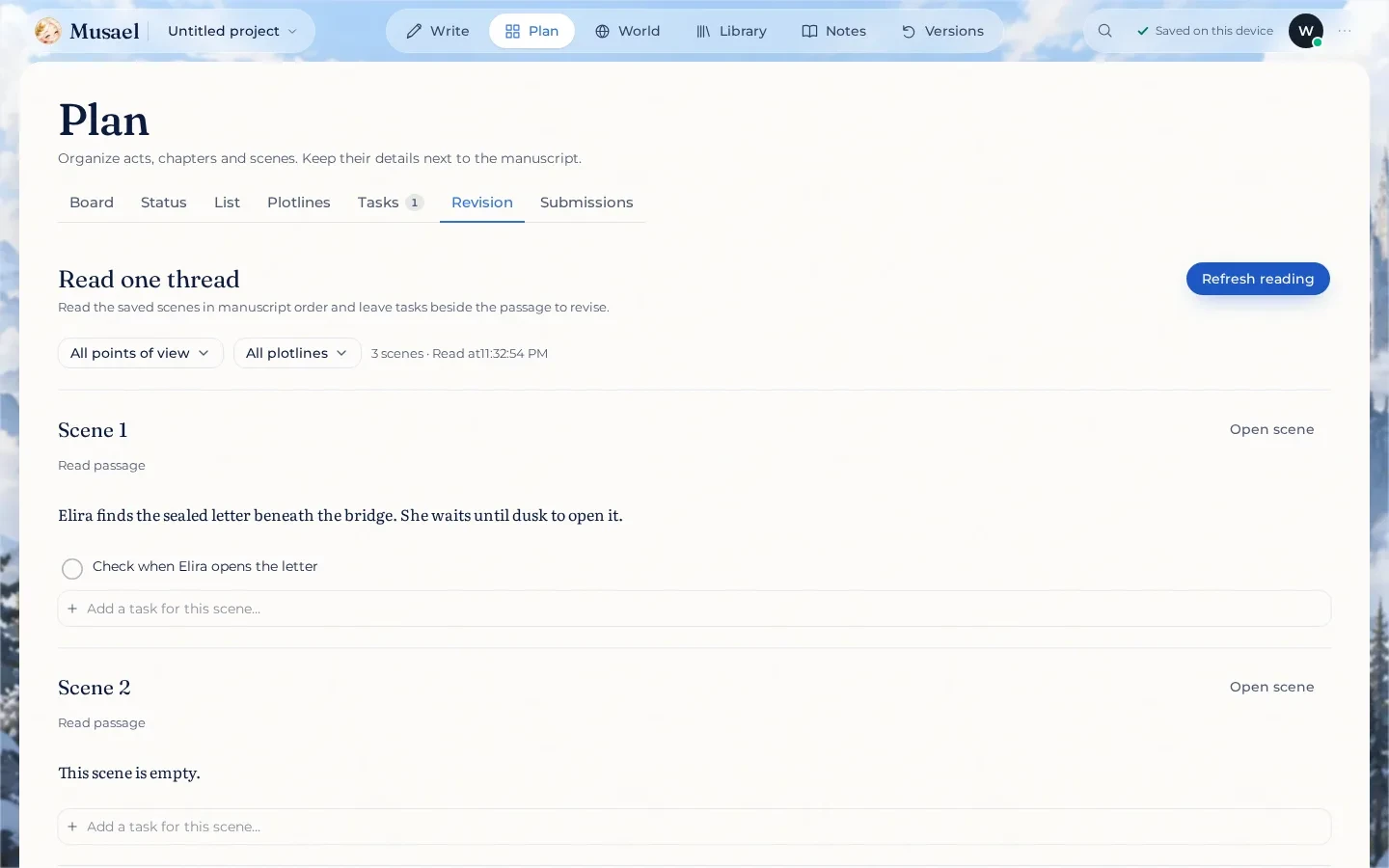
Actual Musael Plan Revision in a test project: saved passage and persistent task. This image is not a competitor benchmark.
Plottr's visual timeline and character-arc planning are strong ways to spot a sparse or uneven outline. Musael adds reading the saved prose and recording persistent scene tasks in the revision view. A task such as “seed Elira's distrust before the reveal” becomes something to complete in the affected scene, not an instruction that rewrites the text automatically.
Musael's World checks cover explicit recorded information, source anchors and author-supplied rules. They do not replace Plottr's templates, prove narrative tension or detect every plot hole. Use the checks for consistency and the thread reading for your own assessment of pacing and causality.
Collaboration depends on the edition
Plottr's official FAQ says Plottr Pro adds a web app, automatic synchronization, cloud backups and real-time collaboration to the desktop planning tools. Those are planning capabilities; do not label them live co-writing of a manuscript without separate evidence.
Musael's collaboration concerns the actual project and manuscript, with version snapshots and reading links for feedback. That is useful when a co-author needs to write or a beta reader needs to discuss a passage. Sharing the project and publishing a public story are separate actions with different scopes.
For someone who only wants an outline partner, Plottr Pro may be sufficient. For someone repeatedly exporting drafts so collaborators can read them, Musael's connected writing and reading workflow is the practical advantage. Neither a cloud backup nor an account subscription removes the need to keep your own recoverable export.
AI, cost and moving a project
Plottr explicitly states that it is not building AI into the product. That can be an advantage for a writer who wants a planning tool without AI features. Musael has managed AI review flows, but deterministic World checks and the new revision reading do not need a paid model call. AI suggestions remain separate from approving a change.
Compare Plottr's desktop and Pro terms separately, then compare those with the Musael plan you would use. Current offers and licenses are on Plottr's official site; Musael's subscription and usage limits are on pricing. Do not treat a discount or trial as the permanent cost of either workflow.
There is no promise of a one-click native Plottr-project migration. Bring an exported manuscript through the supported Word/Markdown/text importer, then recreate or verify plotline notes in Plan. Keep the original outline open while checking a few representative scenes. If the outline is your primary working artifact, that reconstruction cost matters and can be a reason to retain Plottr.
FAQ
Does Plottr Pro collaborate in real time?
Its official FAQ says it supports real-time collaboration alongside its web app, synchronization and cloud backups. This comparison treats that as collaboration on planning; it does not assume the same capability as manuscript co-writing.
Can I use Plottr and Musael together?
Yes. You can retain Plottr for an existing visual outline and move supported prose exports into Musael. Decide where the authoritative scene order and subplot notes live, otherwise maintaining two plans creates avoidable inconsistencies.
Which should I choose for a multi-POV novel?
Choose Musael when you want to read saved POV and subplot passages and attach revision tasks to them alongside World evidence. Choose Plottr when visual outline construction is your main need. A short test with two interleaved POVs will tell you more than a feature count.
Sources and verification
Plottr's official site was checked on 3 October 2026, including the edition FAQ and its explicit no-AI position. See Musael's product overview for the connected writing workflow. No comparative speed, literary-quality or sales claim is established by these sources.